
Z-Defense1.0 - App Store
You'll be able to see results in few seconds.
Publisher Description

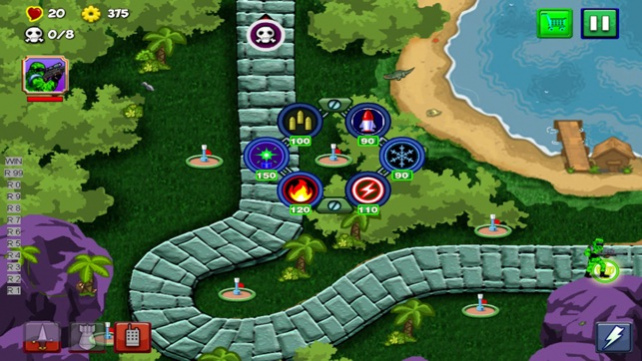

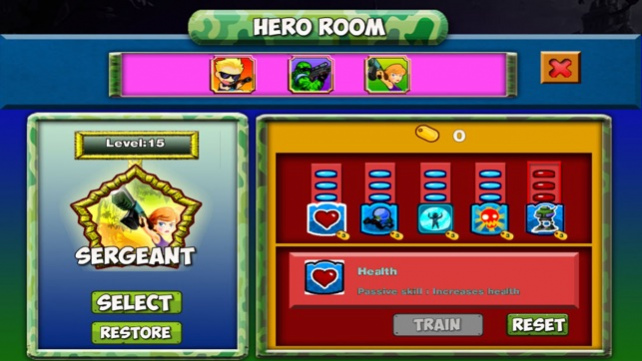
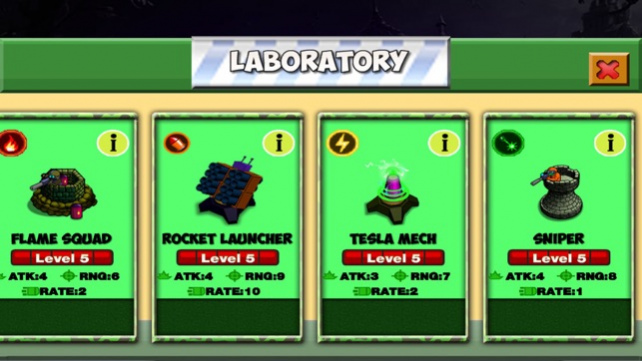
Action fantasy defense game is now available on Phones and Tablets! Get ready for an epic journey to defend your World against Zombies, Robots, Tanks and other enemies using a vast arsenal of towers and Super hero's at your command!
Like other tower defense games, your main objective is to prevent enemy forces from reaching your base by building defensive towers. There are six different basic towers to defend. Each tower has its own specific and unique functions, and each can be upgraded for stronger defenses.
Fight on forests, mountains and wastelands, customizing your defensive strategy with different tower upgrades and specializations! Rain fire upon your enemies, Use Super Hero's to destroy all Evil that tries to over take the world.
Take command of towers with special weapons to hold your defense against endless waves of Zombies and there high tech Robots and Tanks.
GAME FEATURES:
- Command your HERO and see them engage in hand to hand battles!
- 3 Heroes: Choose your champion to lead your troops to victory!
- 6 specialized towers that can be ungraded!
- In-game encyclopedia with information from your towers and enemies.
- Epic defense battles that will entertain you for hours!
- Enter the Shop to pick up Extra Dynamite, Ice Bombs and Laser shots to destroy your enemy.
- Options to buy Coins!
- Rate Game to Receive free coins!
Jun 18, 2016 Version 1.0
This update is signed with Apple’s latest signing certificate. No new features are included.
About Z-Defense
The company that develops Z-Defense is nazary kulinich. The latest version released by its developer is 1.0.
To install Z-Defense on your iOS device, just click the green Continue To App button above to start the installation process. The app is listed on our website since 2016-06-18 and was downloaded 0 times. We have already checked if the download link is safe, however for your own protection we recommend that you scan the downloaded app with your antivirus. Your antivirus may detect the Z-Defense as malware if the download link is broken.
How to install Z-Defense on your iOS device:
- Click on the Continue To App button on our website. This will redirect you to the App Store.
- Once the Z-Defense is shown in the iTunes listing of your iOS device, you can start its download and installation. Tap on the GET button to the right of the app to start downloading it.
- If you are not logged-in the iOS appstore app, you'll be prompted for your your Apple ID and/or password.
- After Z-Defense is downloaded, you'll see an INSTALL button to the right. Tap on it to start the actual installation of the iOS app.
- Once installation is finished you can tap on the OPEN button to start it. Its icon will also be added to your device home screen.
Program Details
System requirements
Download information
Pricing
Version History
version 1.0
posted on 2016-06-18
version 1.0
posted on 2016-06-18
Jun 18, 2016 Version 1.0
This update is signed with Apple’s latest signing certificate. No new features are included.
version 1.0
posted on 1970-01-01
2016年6月18日 Version 1.0
This update is signed with Apple’s latest signing certificate. No new features are included.
Disclaimer
Official App Store Link
We do not host Z-Defense on our servers. We did not scan it for viruses, adware, spyware or other type of malware. This app is hosted by Apple and passed their terms and conditions to be listed there. We recommend caution when installing it.
The App Store link for Z-Defense is provided to you by apps112.com without any warranties, representations or guarantees of any kind, so access it at your own risk.
If you have questions regarding this particular app contact the publisher directly. For questions about the functionalities of apps112.com contact us.
